How to create an offer
Updated Thu Aug 20 2026 00:00:00 GMT+0000 (Coordinated Universal Time)
An offer is the bookable product customers see, built on top of a resource. You need the Admin role, and the resource must already exist.
Create an offer
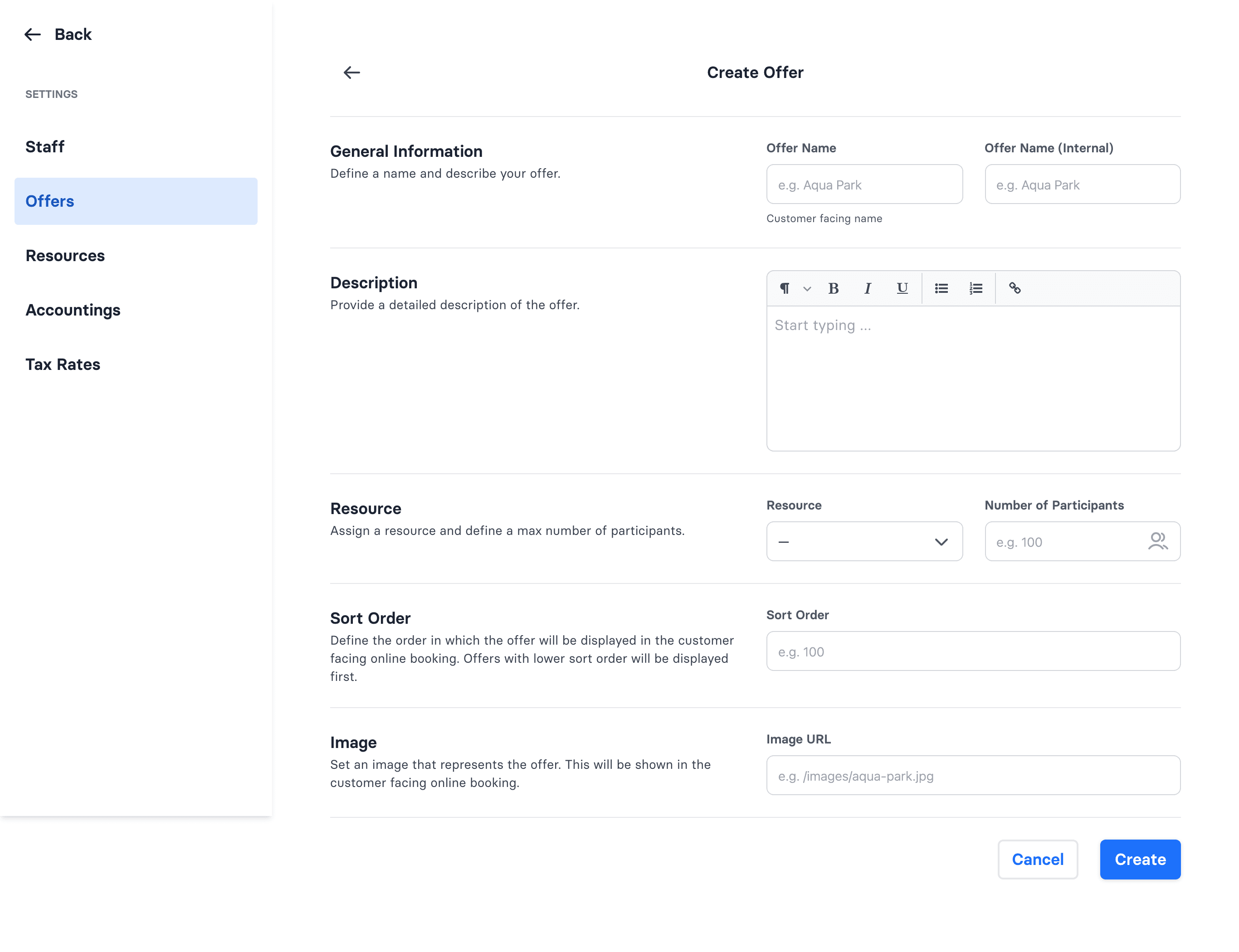
- Go to Admin → Settings → Offers → Create.
- Enter an Offer Name (customer-facing) and an Offer Name (Internal).
- Choose the resource it runs on and set the number of participants (capacity).
- Optionally add a description and an image (both shown in online booking).
- Set a Sort Order — offers with a lower number show first to customers.
- Set the booking rules — Minimum Quantity, Arrive Early, Enable In-Progress Bookings, and Exclusive Booking. The defaults (minimum 1, arrive 30 minutes early, both switches off) suit a normal offer. See Offer booking rules for what each one does.
- Save.
Good to know
- You can't change an offer's resource after it's created — that field is locked on the edit screen. To move an offer to a different resource, create a new offer.
- An offer can be deactivated only if it has no active ticket products attached.
- The same booking rules appear on the Edit screen, so you can change them on an existing offer at any time. They only affect new bookings.
- Time slots (schedules) for the offer are a separate setup — see How to edit your schedule. If you need new slots created, contact wakesys support.